Turn 3D Models into Physical Art
Import any STL or OBJ file, perfectly size it, add a solid backboard, and export as a 3D-printable model ready for shadowbox framing.
Launch Editor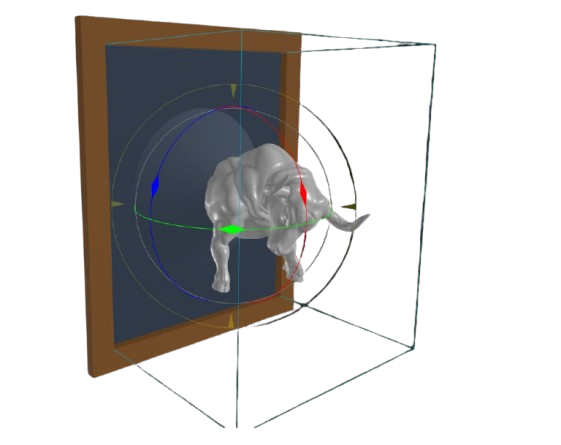
Import any STL or OBJ file, perfectly size it, add a solid backboard, and export as a 3D-printable model ready for shadowbox framing.
Launch Editor
Drag and drop your STL or OBJ model into the editor.
Set your physical frame's internal opening width, height, and depth, then your model placement
Click export to download a ready-to-print STL with a built-in backboard!
Input your physical frame dimensions and your 3D model will automatically scale and center to fit perfectly with 80% coverage.
Generates a solid backboard with a customizable lip that perfectly slides into standard picture frame rabbets.
Simulate placing glass over your art. The editor will automatically trim any geometry that protrudes past the glass line.
Got a small 3D printer? WallSTL automatically splits large models into seamlessly printable tiles tailored to your printer bed size.
How three empty picture frames inspired a lightning-fast, purely client-side web tool for turning raw STLs into perfectly mounted 3D prints.
Read More →PLA and PETG plastics shrink slightly when they cool. Setting a 0.5mm clearance ensures your printed backboard fits smoothly into your wooden frame without sanding.
If your model floats above the backboard, enabling support generates a sturdy cylindrical pillar connecting the model to the backboard.
Yes! WallSTL processes all geometry entirely in your browser using WebAssembly. Your models are never uploaded to a server.